The Brother Skitch PP1 and Brother PE900 both have features I really like. Unfortunately, neither one has all the features I want. If I could combine the Skitch’s magnetic hoop and free arm with the PE900’s larger embroidery area and independent controls, that would be pretty close to my perfect home embroidery machine.
Choosing between them is not simply a matter of buying the more expensive machine. These are very different machines, and those differences affect what you can embroider, how you hoop it, and how you get a design ready to stitch.
I purchased both machines myself, and this comparison is not sponsored. My experience also includes the Brother SE400 sewing and embroidery combination machine and the PE800, the discontinued predecessor to the PE900. I’m an occasional home embroidery hobbyist, not a sewing machine technician. My goal is to give you useful information for your own research, not prescribe one machine for every beginner.
Table of Contents
- Quick Summary
- The Biggest Differences at a Glance
- Size and Design: The Skitch Has a Smaller Footprint
- Hoop Size: 4 x 4 Inches vs 5 x 7 Inches
- The Skitch’s Free Arm Makes Awkward Items Easier
- Artspira Dependence vs Onboard Controls
- Does the PE900 Produce Better Embroidery?
- The Embroidery Software I Use
- For Beginners, a Used Embroidery Machine Is Worth Considering
- Home Hobby Machines, Not Large-Scale Production Equipment
- Shared Supplies and Small Things That Help
- Which Machine Would I Keep?
Quick Summary
- The Skitch offers magnetic hooping and a free arm, but limits designs to 4 x 4 inches.
- The PE900 supports 5 x 7-inch designs and operates without requiring Artspira.
- Good digitizing matters more than assuming a higher-priced machine will produce better embroidery.
- A tested secondhand machine can lower the cost of trying embroidery as a new hobby.
The Biggest Differences at a Glance
Before getting into the everyday experience, here are the tradeoffs that matter most to me:
- Embroidery area: The Skitch has a maximum 4 x 4-inch design area, while the PE900 accommodates 5 x 7-inch designs.
- Hooping: The Skitch uses a magnetic hoop. The PE900’s included hoop uses a traditional tightening screw.
- Access around the embroidery area: The Skitch has a free arm, which helps with certain finished items. The PE900 does not.
- Controls: The Skitch depends on Brother’s Artspira app. The PE900 has onboard functions and does not require the app to operate.
- Design transfer: The PE900 offers USB and wireless transfer options. The Skitch’s workflow runs through Artspira.
- Price and size: The Skitch is the more budget-friendly, compact option. The PE900 is larger, heavier, and significantly more expensive.
Prices move around enough that I would compare current listings rather than choose based on a fixed price quoted here.
Size and Design: The Skitch Has a Smaller Footprint
The Skitch looks quite different from a traditional embroidery machine. My first thought was that it resembled a Keurig coffee maker. It has a compact shape and takes up less space than the PE900, although it is heavier than it looks.
The PE900 is noticeably larger and heavier. That larger machine also gives you a larger embroidery area, so there is a practical tradeoff rather than just a difference in appearance.
If you have limited sewing space, the Skitch’s smaller footprint is worth considering. Just do not assume that its compact appearance means it is featherlight.
Hoop Size: 4 x 4 Inches vs 5 x 7 Inches
Brother Skitch PP1: Smaller designs, easier magnetic hooping
The Skitch comes with a 4 x 4-inch magnetic hoop, and an optional 3 x 3-inch hoop is also available. The important limitation is the maximum design area: for the machine as compared here, that is 4 inches square. I would not buy it expecting a future update to make larger designs possible.
What I really like is the magnetic hoop itself. Instead of adjusting a screw to secure the material between the hoop pieces, you use the magnetic frame. I find it much easier and more convenient to hoop items this way.
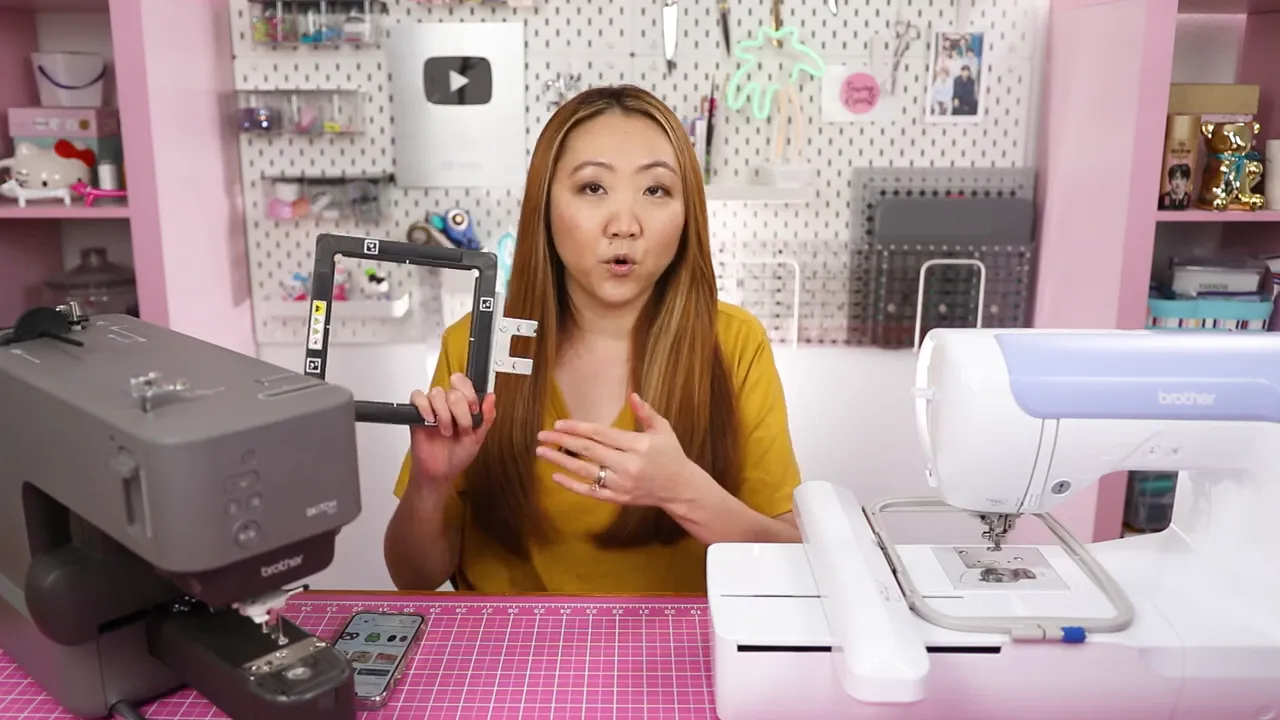
I also find attaching the hoop to the Skitch a little easier than attaching the hoop to the PE900. These might sound like small details, but hooping is part of every project. Convenience adds up.
Brother PE900: More room for larger designs
The PE900 has a 5 x 7-inch embroidery area. That is a significant increase over 4 x 4 inches and gives me more flexibility when I want to stitch a larger design.
Its included hoop uses the traditional screw mechanism. It is still fairly easy to use, but it does not have the same convenience as the Skitch’s magnetic hoop.
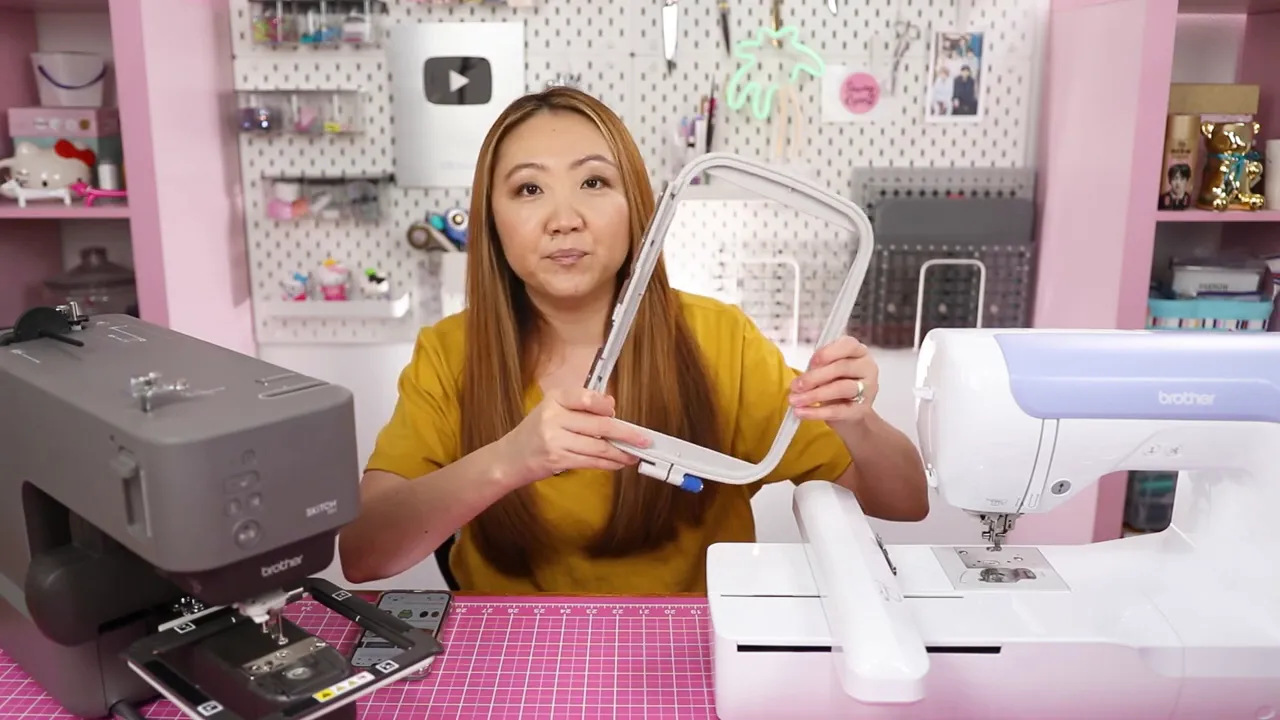
This is one of the central decisions in the Brother Skitch PP1 vs PE900 comparison: do you value easier hooping more, or do you need the larger design area? For my projects, both have been useful.
The Skitch’s Free Arm Makes Awkward Items Easier
The free arm was one of the reasons I bought the Skitch. It gives you room to position an item around and beneath the embroidery area, which can make a real difference with something like a tote bag.
The PE900 does not have a free arm. With a finished item such as a sweatshirt, you may need to fold or roll the rest of the garment up and out of the way. Keeping that extra fabric clear can make hooping a bit of a pain.
I had an easier time embroidering a soft-structured baseball cap on the Skitch than on the PE800 or PE900. That is a specific project where the Skitch’s physical design helped me.
Baby onesies are another item I want to try on the Skitch because I suspect the free arm could make them easier to manage. That is an experiment still on my list, not a result I have confirmed.
For me, the magnetic hoop and free arm are not just nice features on a specification sheet. They have made difficult-to-hoop projects more approachable and expanded the types of items I feel comfortable tackling.
Artspira Dependence vs Onboard Controls
This is my biggest concern about the Skitch: you need Brother’s Artspira app to operate it.
The machine has a few basic buttons, but the app is central to its operation. That means using the machine depends on Brother continuing to support Artspira. Personally, I do not love having that dependency attached to a piece of equipment I purchased.
Brother also offers the paid Artspira+ tier. At the time of my comparison, it was $12.99 per month, which feels like a lot to me for an app with such a specific purpose. The distinction matters here: requiring Artspira is not the same as requiring an Artspira+ subscription. Check the current app features, pricing, and subscription limits before buying so you understand the workflow you will actually have.
The PE900 gives me more independence. It has onboard functions, so I can do things directly on the machine. It is compatible with Artspira, but I do not have to use the app.
It also has a USB port for transferring designs, plus a wireless transfer option. I tried wireless transfer, but honestly, I prefer a USB stick. For me, it is simpler.
That is an important part of choosing a machine that fits you. A feature can sound convenient and still not be the way you prefer to work. I like having the choice.
Does the PE900 Produce Better Embroidery?
In my experience, the PE900 feels slightly smoother in operation. That is my personal impression, not a technical performance test.
As far as finished design quality goes, I would expect comparable results from these machines when using an appropriate, well-digitized design and a suitable setup. I would not buy the PE900 solely because I assumed its higher price automatically meant prettier stitches.
The embroidery file matters enormously. If a design stitches poorly, the machine is not necessarily the problem. The way the design was digitized is worth investigating before deciding you need a different machine.
A picture is not an embroidery file
Neither machine can simply take an ordinary picture and stitch it as-is. The artwork needs to be digitized specifically for machine embroidery, creating the stitch instructions the machine follows. For background on that distinction, the machine embroidery overview explains the role of digitizing and embroidery files.
The same principle applies to appliqué. A regular filled embroidery design does not become an appliqué design because you select a setting on the machine. The placement, tack-down, and finishing sequence needs to be built into the design through digitizing.
Both the Skitch PP1 and PE900 use PES embroidery files. Different machine brands support different formats, so file compatibility is something to research when shopping for either a machine or designs.
The Embroidery Software I Use
I use Embrilliance Essentials for basic work such as lettering, monograms, and saving embroidery files. I paid for my copy, although I am also an Embrilliance affiliate.
One of the biggest reasons I like it is the purchasing model: it is a one-time software purchase rather than a subscription. It runs on my computer, does not require me to be online for everyday use, and is not dependent on a cloud-based workspace.
It is available for Windows and Mac, which is another plus.
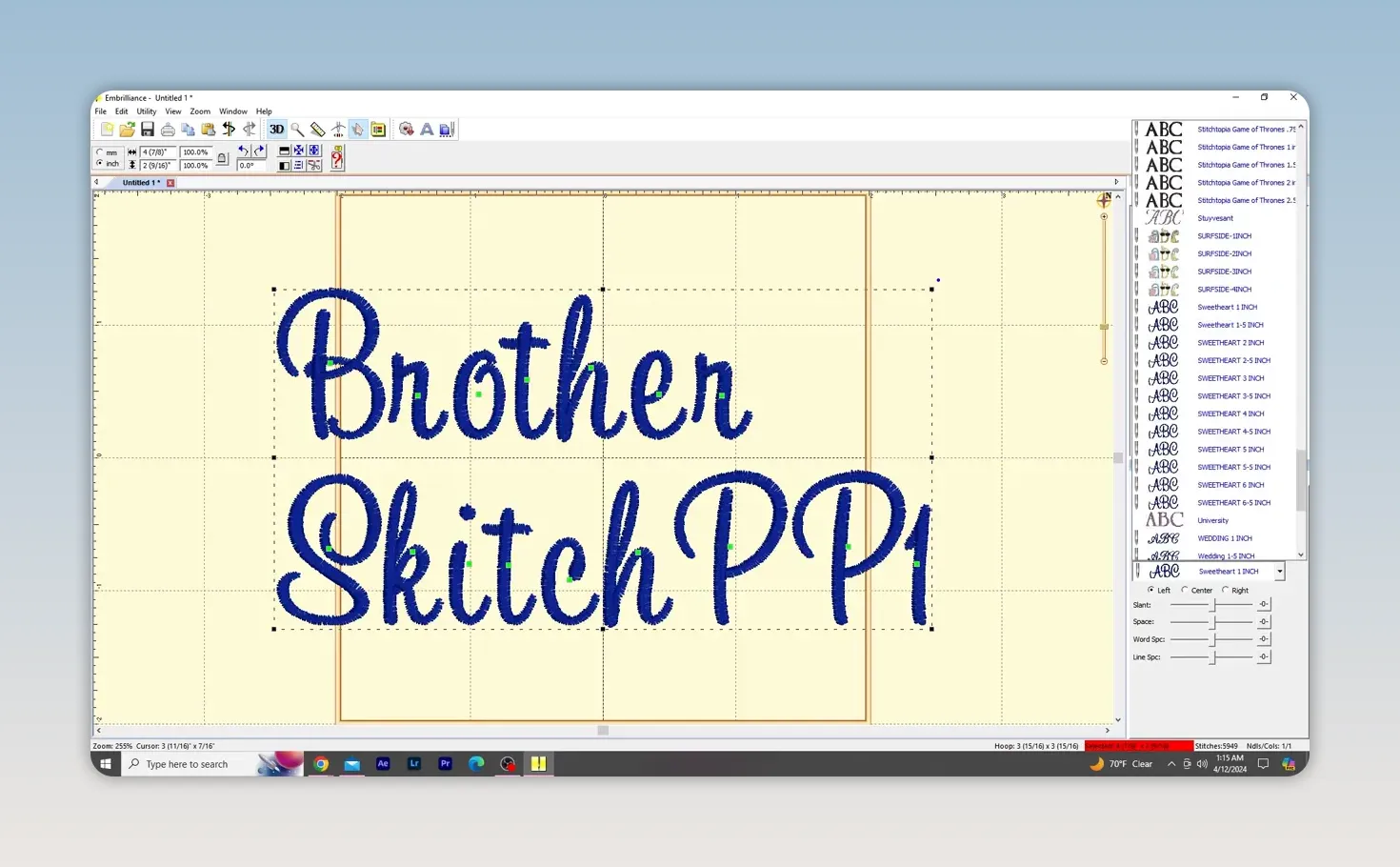
That is separate from assuming any basic embroidery program will turn arbitrary artwork into a properly digitized design. The lettering and file work I do should not be confused with full custom digitizing.
For Beginners, a Used Embroidery Machine Is Worth Considering
If you are interested in machine embroidery but have no idea whether you will stick with it, I would seriously consider buying used. That is not a recommendation for one specific model. It is a way to try the hobby without putting as much money into the initial purchase.
I bought my machines new, but I have seen plenty of embroidery machines listed on Facebook Marketplace and other resale sites. Places to check include:
- Facebook Marketplace
- eBay
- Mercari
- Nextdoor
I suspect some people purchased machines during the pandemic and never ended up using them as much as they expected. Whatever the reason for selling, lightly used machines can offer good value.
The discontinued PE800 is another model you may encounter secondhand. It is the older version of the PE900, so it may be worth including in your research rather than limiting your search to new machines.
Make sure a used machine works, and test it if possible. A low price is much less appealing if you cannot confirm that it will stitch.
Home Hobby Machines, Not Large-Scale Production Equipment
My use is pretty casual. I make little projects here and there, and I do not put huge amounts of mileage on my embroidery machines. That is the perspective behind this comparison.
The Skitch and PE900 are home embroidery machines. I would not approach either one as the equipment solution for a large-scale embroidery business.
If production work is your goal, commercial machines belong in a different research category, with a very different budget. You can easily spend $10,000 on a commercial embroidery machine, even used. Those machines are better suited to that kind of business activity, but the financial commitment is much bigger.
Shared Supplies and Small Things That Help
Despite looking so different, these machines do share some supplies. They take the same bobbins, and I can use the same needles with both.
Two things have helped my own embroidery experience:
- A separate thread stand: I find it helps the thread feed without getting tangled, and I have noticed fewer thread breaks.
- Prewound bobbins with embroidery bobbin thread: I have had better luck using these in my projects.
Those are personal observations, not guarantees that one accessory will solve every stitching problem. If you need machine-specific troubleshooting, contact Brother product support rather than treating another hobbyist’s experience as a technical diagnosis.
Which Machine Would I Keep?
If I could only keep one, I would probably keep the Brother PE900. The larger embroidery area, onboard functions, and ability to use USB without dealing with an app are important to me.
But this really is an apples-to-oranges comparison. I am glad I own the Skitch, too. Its magnetic hoop makes my life easier, and the free arm is useful for items that are awkward to position on the PE900.
My ideal machine would have:
- At least a 5 x 7-inch embroidery area
- A magnetic hoop
- A free arm
- Onboard controls
- A USB port
- No required app for operation
If my PE900 had the magnetic hoop and free arm I like on the Skitch, I would not need the Skitch for my own projects. On the other hand, a Skitch with a larger embroidery area, onboard controls, and USB would likely cost more than the budget-friendly machine it is now.
That is why I will not give every beginner the same answer. Think about the size of designs you want to stitch, the finished items you want to embroider, your budget, and how comfortable you are depending on an app. Those priorities will tell you more than a blanket claim that one machine is better.
Neither is perfect for my needs, but each has earned its place in my sewing space. Whatever you choose, leave room for experimenting and keep it fun.


